Webhook security
Learn how to secure web hooks from Bunny by verifying their signature
To prevent malicious actors sending fake payloads to your webhook endpoint we recommend using the following settings to improve security by making it possible to verify that Bunny was the sender of the webhook.
- Webhook auth token - You can create your own token/apikey and set it in Bunny. This value will be included as bearer token in an “Authorization” header of the webhook request.
- Webhook signing key - We will use this value as the shared secret key to generate a HMAC-SHA1 hash of the webhook request body. The resulting signature will be include in the x-bunny-signature header so you can use it to verify that the payload was sent by Bunny.
Set a shared signing secretLink to Set a shared signing secret section
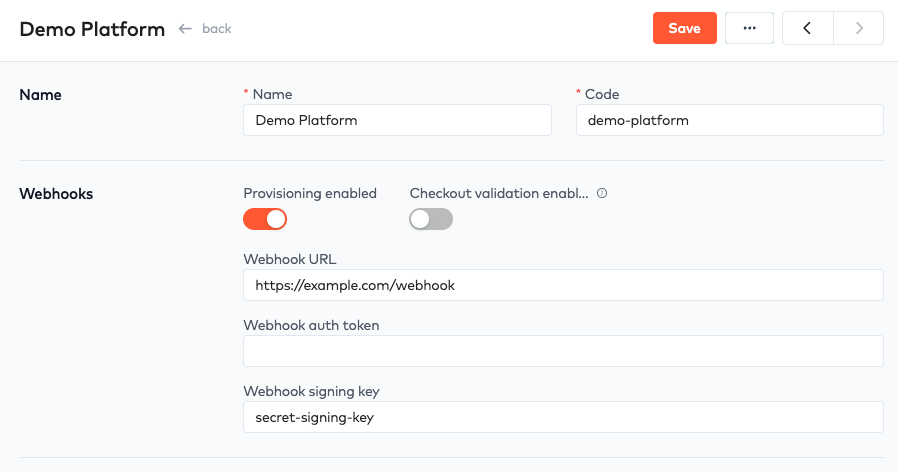
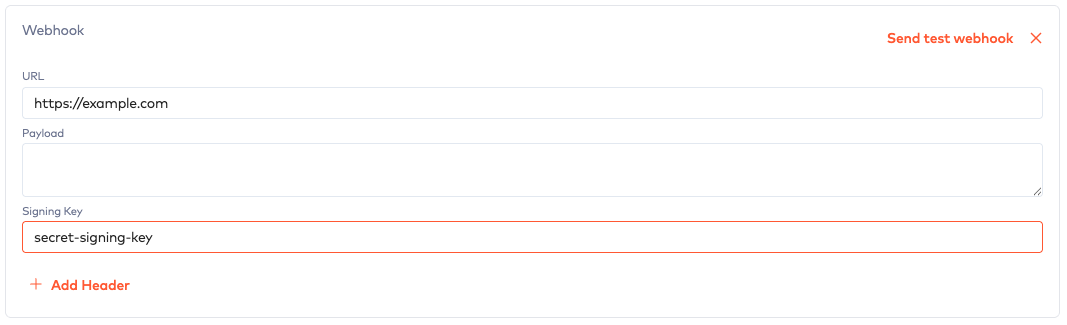
Bunny will sign each webhook payload using a shared secret that you provide. This can be configured for platform webhooks and workflow webhooks.
Enter a value in the Webhook signing key field and use this in your code to verify the webhook signature.
PlatformLink to Platform section
Workflow actionLink to Workflow action section
Verify a webhook signatureLink to Verify a webhook signature section
When a signing key is configured Bunny will use this secret to sign the webhook payload and then include the signature in a x-bunny-signature header.
You will extract the signature from the webhook header and then compare it against your own HMAC-SHA1 hash of the payload using your signing key.
To make signature validation easier you can use one of our SDKs.
signature = request.headers["x-bunny-signature"];

payload = '{"type":"SubscriptionProvisioningChange","payload":{"subscription":{"id":27,"state":"trial","trial_start_date":"2022-06-04","trial_end_date":"2022-06-18","start_date":null,"end_date":null,"auto_renew":false,"account":{"id":33,"name":"Ondricka, Flatley and Kessler"},"tenant":null,"product":{"code":"stealth","name":"Stealth","description":null,"sku":null},"features":[{"code":"users","quantity":1},{"code":"crm","quantity":null}]}}}'

signingKey = "<signing_key>";

valid = BunnyApp::Webhook.verify(signature, payload, signing_key)
let signature = req.headers["x-bunny-signature"];

let payload = '{"type":"SubscriptionProvisioningChange","payload":{"subscription":{"id":27,"state":"trial","trial_start_date":"2022-06-04","trial_end_date":"2022-06-18","start_date":null,"end_date":null,"auto_renew":false,"account":{"id":33,"name":"Ondricka, Flatley and Kessler"},"environment":null,"product":{"code":"stealth","name":"Stealth","description":null,"sku":null},"features":[{"code":"users","quantity":1},{"code":"crm","quantity":null}]}}}';

let signingKey = "<signing_key>";

let valid = bunny.webhooks.validate(signature, payload, signingKey);
IP AddressesLink to IP Addresses section
Webhook requests from Bunny originate from the following IP addresses:
- 52.5.155.132
- 52.87.82.133