Installation
Install @bunnyapp/components, add its peer dependencies, whitelist your origin and pick the token each component needs.
npm i @bunnyapp/components
Until 2.0.0 is released, install the prerelease with npm i @bunnyapp/components@beta (2.0.0-beta.N).
Peer dependenciesLink to Peer dependencies section
The package expects these to be installed in your app:
npm i react@18 react-dom@18 antd @ant-design/icons @tanstack/react-query graphql graphql-request \
  @stripe/stripe-js @stripe/react-stripe-js @sentry/react @pdf-viewer/react interweave \
  less lodash-es pluralize recharts recoil styled-components \
  @fortawesome/fontawesome-svg-core @fortawesome/free-brands-svg-icons \
  @fortawesome/free-regular-svg-icons @fortawesome/free-solid-svg-icons \
  @fortawesome/react-fontawesome
The components support React 18 only (React 19 is not supported). See peerDependencies in the package’s package.json on npm for the supported version ranges.
Whitelist your originLink to Whitelist your origin section
Bunny checks the hostname of the page that embeds the components against a list of allowed domains. Add every site that will embed them, for example localhost for development and app.acme.com for production. Without this, requests are rejected with a 401 CORS origin not allowed error.
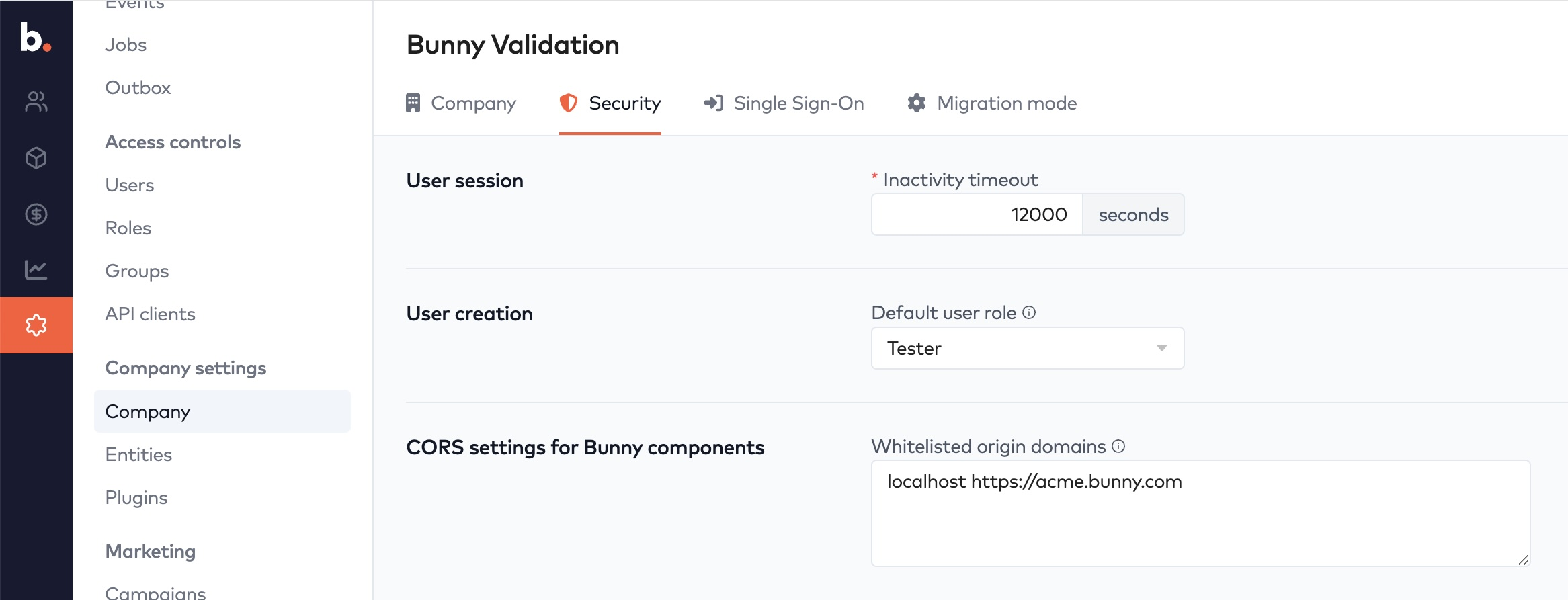
In Bunny, go to Settings > Company > Security and add them under Whitelisted origin domains (card “CORS settings for Bunny components”), separated by spaces.
- Use the hostname only: no scheme (
https://) and no port.localhostcovers every port. - The match is exact and there are no wildcards, so list each subdomain separately.
- A request without a
Refererheader (for example when your site sendsReferrer-Policy: no-referrer) is rejected too.
TokensLink to Tokens section
Every component needs a token on its BunnyProvider. Which token to use:
| Component | Token |
|---|---|
| Checkout, BillingDetails, Invoice, Subscriptions, Quote, Quotes, Transactions | A portal session token, which scopes the token to a single account. See how to generate a portal session token. |
| Signup | An API client token that only has the signup:read and signup:write scopes. See Signup. |